
Security Advisory · PHP2Shell
Two Critical PHP Security Vulnerabilities: What Website Owners Need to Do
Known as PHP2Shell, CVE-2026-109618 and CVE-2026-109619 affect the PHP software that runs most websites, including WordPress. See which versions are affected and the exact questions to ask your hosting provider.
- CVE-2026-109618
- CVE-2026-109619
- Last reviewed 27 Oct 2026
The two critical PHP security vulnerabilities known as PHP2Shell, fixed on 21 October 2026, put any WordPress site on an unpatched server at risk. This guide explains what that means for your business and what to do next.
In short
Two serious flaws in PHP let attackers break into websites without a password. Singapore’s CSA reports widespread attempts to exploit them. Updating WordPress won’t fix it: your hosting provider must patch PHP. Send them the 5 questions below today.
Am I affected? If your website runs on a fully hosted platform such as Shopify, Wix or Squarespace, you don’t manage its server software, so there is nothing for you to patch. If you have a WordPress site or another self-hosted PHP website, read on.
- CVSS v4.0, each
- 9.2 Critical
- Login needed
- None Unauthenticated
- Affected
- 5.4 – 8.5.11 Per Google's analysis
- Fixed in
- 4 releases 8.5.12 · 8.4.27 · 8.3.36 · 8.2.35
01
What Are the Two PHP Security Vulnerabilities?
The two flaws are widely known as PHP2Shell, the name used in Singapore CSA’s alert and by security researchers. Both are flaws in PHP itself, not in WordPress or any plugin. They were fixed on 21 October 2026, a day after the PHP security team warned that a critical release was coming. In both cases, PHP can end up trusting internal data that is no longer valid.
20 Oct
PHP security team pre-announces a critical release
21 Oct
Patched PHP releases published; CSA issues alert
22 Oct
Hosting providers report patches and mitigations
23 Oct
CSA updates its alert; PHP adds a session upload progress advisory
26 Oct
PHP rebuilds Windows packages for a separate Brotli fix

1.1CVE-2026-109618: A PHP Out-of-Memory Handling Vulnerability
In simple terms: an attacker can send a request that makes PHP run out of memory at exactly the wrong moment. PHP then cleans up using half-finished data, which can let the attacker run their own code on the server.
1.2CVE-2026-109619: A PHP Stale Internal State Vulnerability
Servers often reuse the same PHP process for one visitor after another. With this flaw, leftover data from one visit can be reused by the next visit in an unsafe way, which can also let an attacker run code or read data from memory.
</>Technical details for developersHow each flaw works, from the official PHP advisories
CVE-2026-109618. When PHP runs out of the memory it is allowed to use, it stops the request immediately. According to the official PHP advisory, this can happen while internal request data is only partially initialised. The cleanup code that runs afterwards may then treat that invalid data as valid. The advisory says crafted multipart form data (the format used for uploads and many forms) can trigger the condition, enabling unauthenticated remote code execution as the web server's worker account.
CVE-2026-109619. Many servers reuse the same PHP worker process for one request after another. The PHP advisory for CVE-2026-109619 explains that some request-owned state can survive after its memory has been freed, and a later request on the same worker may use it before PHP resets it. This is a use-after-free bug, confirmed against both mod_php and PHP-FPM.
1.3Why These Vulnerabilities Are Considered Critical
The PHP project rates both as critical (CVSS v4.0 9.2) because, on an affected server, an attacker with no account may be able to run their own code with the PHP worker’s permissions, or read data from memory. The PHP security notice says the risk is highest on servers that run PHP as a web server module (mod_php), where the attack can happen before WordPress even loads, so a WordPress security plugin would not get a chance to block it.
For a business, that could mean defaced pages, injected malware, stolen form data or a server used to attack others. Not every affected website will be compromised, since exploitation depends on the configuration, but the potential impact is too serious to wait for the next routine maintenance visit.
Singapore advisory
The Cyber Security Agency of Singapore published alert AL-2026-151. The alert reports widespread exploitation attempts, and CSA’s 23 October update said it continued to be aware of them, urging organisations to act immediately.
02
Which PHP Versions Are Affected?
Every release below the patched version on its branch is affected. A version is vulnerable if it is older than the fix on its own branch: PHP 8.4.26 is affected, PHP 8.4.27 is not. You do not need to switch branches to be protected.
| PHP branch | Patched in | Recommended next action |
|---|---|---|
| 8.5 | 8.5.12 | Update to 8.5.12 or the latest 8.5 release. |
| 8.4 | 8.4.27 | Update to 8.4.27 or the latest 8.4 release. |
| 8.3 | 8.3.36 | Update to 8.3.36 or the latest 8.3 release. |
| 8.2 | 8.2.35 | Update now, and plan a move to a newer branch: security support ends 31 Dec 2026. |
| 8.1 and earlier | No official release (source backports for 7.4–8.1 only) | Upgrade to a supported branch, or confirm a verified backport from your Linux distribution or vendor. |
Sources: PHP security release notice, PHP 8.5.12 announcement, PHP supported versions. Checked 26 October 2026.
These were the original emergency fixes. Check the PHP release archive for the newest release on your branch rather than assuming October’s version is still the latest.
PHP 8.1 and earlier have reached end of life and receive no upstream fix. The PHP security team published minimal source backports for 7.4, 8.0 and 8.1, and some Linux distributions and vendors ship their own patched packages, so ask your provider which applies to you.
Why your version number may look “old” after patching
Some hosts patch PHP inside their own packages without changing the version number. Servers using CloudLinux alt-php or cPanel EasyApache (ea-php) packages, for example, may still show 8.2.34 with the fix included. The provider’s confirmation counts more than the number.
- VodienIts status page reported PHP patching completed across shared Linux hosting on 22 October, and noted that CloudLinux servers may still show versions such as 8.2.34 with the fix applied. Temporary limits on large uploads and form submissions remained while it monitored.
- SiteGroundIts blog post said it deployed server-level mitigations and disabled the affected functionality before the release, then applied PHP’s fixes on 21 October, and that customers did not need to do anything.
The providers’ own statements, not independent verification by SG Web Builder. They do not cover VPS or self-managed servers. Ask your provider to confirm your own account.
Do not rush to PHP 8.5 blindly
The newest branch is not automatically the right one. Older themes, plugins and custom code may not support it. Patch your current supported branch first, then plan and test any bigger upgrade. If an older website cannot run on a supported PHP version at all, it may be time to consider a website redesign.
03
Can These PHP Vulnerabilities Affect WordPress Websites?
Yes. A WordPress website has three layers, and each is updated separately:
- WordPress core, themes and pluginsUpdated from the WordPress dashboardLAYER 01
- PHP runtimeExecutes WordPress. Where both vulnerabilities liveLAYER 02
- Hosting infrastructureWeb server, PHP-FPM or mod_php, system packagesLAYER 03
PHP sits in the second layer. It is installed on the server and updated by your hosting provider or server administrator. WordPress can show you which PHP version is running (see section 4.2), but it has no control over it.
Illustrative scenario, not a real customer incident
A small online shop keeps WordPress, WooCommerce and every plugin up to date, and its security plugin shows no issues. But the server still runs PHP 8.3.30. The dashboard looks healthy while the runtime underneath stays vulnerable until the host installs 8.3.36 or later and restarts PHP.
04
How to Fix CVE-2026-109618 and CVE-2026-109619
The PHP project states that updating to a patched release is the only complete fix. How you get there depends on who manages your server.

4.1Ask Your Hosting Provider to Verify the PHP Security Patch
On shared or managed hosting you usually cannot patch PHP yourself. Send your provider these questions:
- Is the PHP runtime serving my domain affected by CVE-2026-109618 or CVE-2026-109619?
- Has the applicable security patch been installed?
- Which patched PHP release or vendor package is running?
- Are other PHP runtimes, staging sites or applications on my hosting account affected?
- Must PHP-FPM, Apache or another web-serving process be restarted to load the patched runtime, and has that been done?
Prefer to send an email? Copy this template, fill in the parts in brackets and send it to your hosting provider’s support team.
Subject: Please confirm the PHP patch for CVE-2026-109618 and CVE-2026-109619
Hi [hosting provider] support team,
On 21 October 2026, the PHP project released security fixes for CVE-2026-109618 and CVE-2026-109619. Could you please confirm the following for my hosting account ([your domain]):
- Is the PHP runtime serving my domain affected by CVE-2026-109618 or CVE-2026-109619?
- Has the applicable security patch been installed?
- Which patched PHP release or vendor package is running?
- Are other PHP runtimes, staging sites or applications on my hosting account affected?
- Must PHP-FPM, Apache or another web-serving process be restarted to load the patched runtime, and has that been done?
Thank you,
[Your name]
The exact steps depend on the hosting setup. On shared hosting, do not try to restart services or change server configuration yourself unless your provider supports it.
4.2Check the PHP Version Used by Your Website
In WordPress, the version your website actually runs on is here:
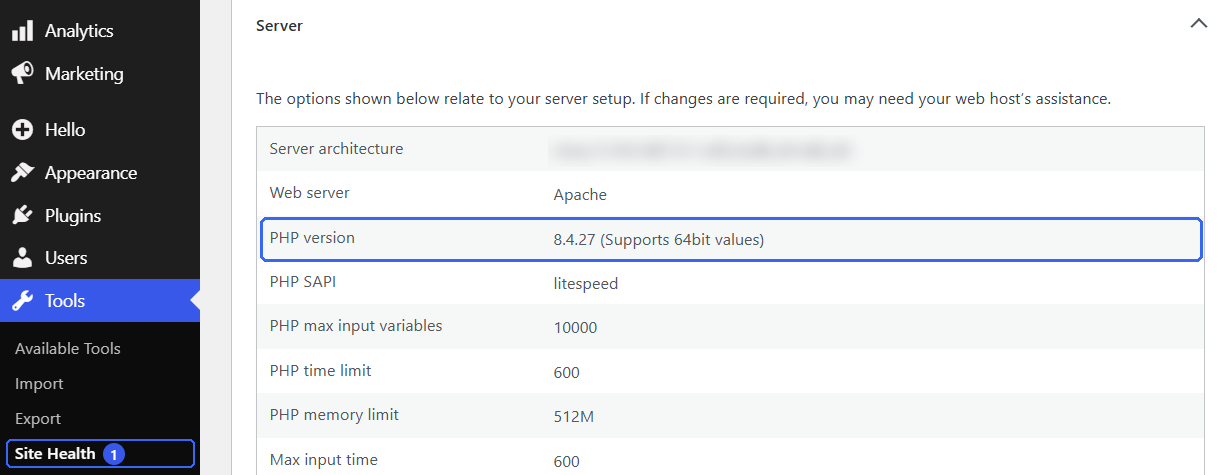
Tools → Site Health → Info → Server: this website runs PHP 8.4.27, the patched release for the 8.4 branch.
Your hosting panel may also show the PHP version set for the domain. If the two do not match, ask your provider which runtime is really serving requests.
Avoid public diagnostic pages
Do not leave a public phpinfo() page or diagnostic script on a live website. It shows detailed server information to anyone who finds it.
4.3Apply the Correct Security Update
If you or your developer manage the server, follow a prompt but controlled process:
- Back upWebsite files and database
- Check compatibilityWordPress, theme, plugins, custom code
- Test in stagingWhen a staging site is available
- Apply the patchPatched PHP release or verified vendor fix
- Restart or redeployWhere the environment requires it
- Test the websiteForms, integrations, checkout
- Review error logsLook for new PHP errors or warnings
Do not skip the restart. According to Google’s analysis, upgrading packages on disk can leave the old, vulnerable PHP code loaded in workers that are still running, such as PHP-FPM or Apache with mod_php. Ask your provider or administrator to confirm the patched runtime is the one handling requests.
The PHP advisories list temporary settings for administrators who cannot update straight away, but the PHP project is clear these only reduce exposure. They are not a substitute for the patch.
Follow-up advisories after 21 October
- 23 October: PHP published an informational advisory on session upload progress (CVE-2026-115560) and suggests setting
session.upload_progress.enabled=0until the next regular release. Applications that never change the session serializer at runtime can keep the feature enabled. - 26 October: PHP rebuilt its Windows packages (8.5.12-1, 8.4.27-1, 8.3.36-1, 8.2.35-1) to fix a separate Brotli flaw. This only affects PHP running on Windows servers, and the PHP version numbers stay the same.
4.4Investigate Potential Compromise if Necessary
Running an affected version does not prove your website was attacked. But with exploitation attempts reported, look for warning signs if the server stayed unpatched after 21 October 2026: unusual errors or crashes in the logs, administrator accounts nobody recognises, unexpected file changes and security alerts from your host or plugin.
If you find any, change hosting, WordPress, database and email passwords, remove unknown accounts, look for backdoor files or scheduled tasks, and consider professional incident-response help.
Important
Patching PHP does not remove malware that is already installed. It closes the hole, but anything an attacker added before the patch stays until it is found and removed.
05
How Hosting Updates and Website Security Monitoring Work Together
Patching PHP fixes these two vulnerabilities, but a good response covers four things, often handled by different people:
PHP patching
Installing the fixed runtime and restarting PHP. Usually your hosting provider.
Hosting account security
Strong control panel passwords, two-factor authentication where offered, limited access.
WordPress login monitoring
Watching for new administrator accounts and unusual sign-ins.
Backup and recovery
A recent, tested backup stored separately.
cPanel and other control panels may offer login history and security notifications, but features vary by provider and plan. Do not assume you will be alerted to sign-ins from unfamiliar IP addresses or new WordPress administrators: check what your host and security plugin actually send. An unfamiliar IP is a reason to investigate, not proof of an attack.
For the wider routine of updates, backups and login protection, see our guide to WordPress website maintenance and keeping your site secure.
06
PHP Security Checklist for Website Owners
Use this checklist to track your response to CVE-2026-109618 and CVE-2026-109619. Your progress stays in this browser tab and is not saved or sent anywhere.
01Patch
- Confirm whether the deployed PHP runtime was affectedCompare the running version, or the provider’s answer, with the affected range.
- Verify the relevant patch or supported vendor fixGet the patched release number or vendor package confirmed.
- Check other runtimes and applicationsStaging sites, add-on domains and other PHP apps on the account.
- Verify the running process has loaded the fixUpdated packages only protect you once PHP workers are restarted.
02Review
- Test essential website functionalityForms, logins, integrations and checkout after the update.
- Review security logs if activity looks suspiciousUnusual errors, crashes or requests can point to probing.
- Check administrator accounts and file changesLook for accounts or files nobody on your team added.
03Record
- Confirm a usable backup is availableA recent backup you can actually restore, stored separately.
- Record the remediation date and open actionsNote who confirmed the patch, when, and anything still pending.
07
Need Help Checking Your Website’s PHP Security?
Not every business has the time or the technical access to chase hosting providers and read version numbers. SG Web Builder can help review your website’s configuration, PHP version information, hosting update status, compatibility, backups and relevant security indicators, subject to the agreed service scope and the hosting access available.
Service
PHP Security Check
from S$80
- Patch confirmation with your hosting provider
- Restart and runtime verification: checking that the patched PHP is the one actually serving your website
- Compatibility and backup check
- A short written summary of what we found and any next steps
Rate
S$80 / hour
Our published website maintenance rate
Typical session
1 – 2 hours
Some PHP remediation or upgrade work may take longer
Not sure whether your website is running a patched PHP version? Contact SG Web Builder to review your website’s current setup and identify the next steps, or send our team a message.
08
Frequently Asked Questions
What is PHP2Shell?
PHP2Shell is the name used by Singapore’s CSA and security researchers for CVE-2026-109618 and CVE-2026-109619, two critical PHP vulnerabilities patched on 21 October 2026. They can let an attacker run code on an unpatched server without logging in.
What are CVE-2026-109618 and CVE-2026-109619?
They are two critical memory-safety vulnerabilities in the core PHP runtime, disclosed on 21 October 2026. CVE-2026-109618 involves out-of-memory handling that can leave request data half-initialised, and CVE-2026-109619 involves stale internal state reused by a later request on the same worker. Both can allow unauthenticated remote code execution on affected servers.
Which PHP versions are affected by these vulnerabilities?
Every release older than the patched version on each branch is affected: below 8.5.12, 8.4.27, 8.3.36 and 8.2.35. Google’s analysis describes the range as PHP 5.4 through 8.5.11. PHP 8.1 and earlier are end of life and receive no upstream fix.
Which PHP releases contain the original security fixes?
PHP 8.5.12, 8.4.27, 8.3.36 and 8.2.35, all released on 21 October 2026. Newer releases on the same branches will also include the fixes, so check the official PHP release archive for the latest version on your branch.
Can these PHP vulnerabilities affect WordPress websites?
Yes. WordPress runs on PHP, so a WordPress website hosted on an affected PHP release is exposed, even when WordPress core, themes and plugins are fully up to date.
Does updating WordPress fix PHP security vulnerabilities?
No. WordPress updates change WordPress files only. PHP is installed on the server and must be patched by whoever manages it, usually your hosting provider.
How do I check my website’s PHP version?
In WordPress, go to Tools → Site Health → Info → Server and look at the PHP version row. Your hosting control panel may also show the version configured for the domain. Some vendor packages include the fix without changing the version number, so ask your provider to confirm.
Does my hosting provider update PHP automatically?
It depends on the provider and the type of hosting. Managed and shared hosting providers often patch PHP for you, while on a VPS or self-managed server it is usually your responsibility. Ask your provider to confirm the patch status of your account.
Should I upgrade to the newest PHP version immediately?
Apply the patched release on your current supported branch first. Moving to a much newer branch, such as PHP 8.5, should be planned and tested, because older themes, plugins or custom code may not be compatible.
Does patching PHP remove malware from a compromised website?
No. Patching closes the vulnerability but does not remove files, accounts or code an attacker added beforehand. A compromised website needs to be investigated and cleaned separately.
Where can I get help checking PHP security?
Start with your hosting provider, who controls the PHP runtime. SG Web Builder can also review your website’s PHP version, hosting update status, compatibility and backups through our website maintenance service at S$80 per hour.
Still have questions? Read about our website maintenance service or email us at louis@8clicks.com.sg.
Sources
- PHP: Security releases and advisory, 21 October 2026 Official
- PHP advisory GHSA-w8hw-w9fx-j79w (CVE-2026-109618) Official
- PHP advisory GHSA-6wmf-4rv5-p3rp (CVE-2026-109619) Official
- PHP 8.5.12 release announcement Official
- PHP supported versions Official
- CSA Singapore alert AL-2026-151 Government
- Google Cloud: Responding to core PHP vulnerabilities Supplementary
- Vodien status: PHP security mitigations on shared Linux hosting Provider
- SiteGround: Critical PHP vulnerabilities, SiteGround sites protected Provider
- PHP: Session upload progress advisory (23 Oct) and Windows builds update (26 Oct) Official
Keep your website patched, backed up and checked
Talk to our team about website maintenance that includes PHP version and hosting update checks.