
WordPress Hosting · PHP
Is Your WordPress Website Running the Latest PHP Version?
Your Host Updated PHP. Check Yours.
A hosting provider can patch PHP on its servers while your website keeps running an older branch. Here is how to tell the difference, check your real WordPress PHP version and upgrade it without breaking the site.
- Last reviewed 5 Nov 2026
- Checks in 2 minutes
- Sources: php.net, WordPress.org
Hosting notice
Scheduled maintenance completed
Server patched
“PHP has been updated and security improvements have been applied to our servers.”
But which PHP does your website run?
WP
Tools → Site Health → Info → Server
Web server
Apache
PHP version
7.4.33End of life · 28 Nov 2022
PHP memory limit
256M
Illustration of a common situation, not a client’s screen.
“Your hosting company says PHP has been updated. But when did you last check the PHP version your website is actually using?”
Picture this. A business owner receives an email from their hosting provider: PHP has been updated and security improvements have been applied. Reasonably, they assume the website is now up to date. Weeks later, their developer opens the WordPress dashboard and finds the site still running a PHP branch that stopped receiving security fixes years ago.
Nobody lied. The host patched the PHP packages on its servers, exactly as promised. But the website PHP version assigned to that particular domain was never changed, and nobody checked it. (An illustrative scenario, not a specific client.)
The reason: patching PHP and choosing the PHP version are separate. The version is set per domain, and on many hosting plans it stays where it was until someone changes it. So it pays to know how to check your WordPress PHP version yourself. It takes about two minutes.
One real check · 5 Nov 2026
Same website, three places
PHP 8.2
hosting account default in cPanel
PHP 8.5
the version actually set for this domain
8.5.12
what WordPress Site Health reports
Look only at the account default and you would get it wrong. And the same panel still offered PHP 5.2, a branch that has been unsupported for over a decade. See the screenshots ↓
This guide picks up where our article on the recent PHP security vulnerabilities left off. That one asked whether your host has patched PHP. This one asks which PHP your website is actually running, whether that branch is still supported, and how to move it safely if not.
01
Why an Old PHP Version Is a Problem, Even If Nothing Looks Wrong
An outdated PHP version is not proof that a website has been hacked. A known vulnerability is a published flaw; an unsupported branch is a version the PHP project no longer fixes; a compromised website is one an attacker has actually accessed. An old PHP version puts you in the middle group: exposed to a risk that grows every year, with four practical costs.
No more security fixes
Once a branch reaches end of life, newly found flaws in it may never receive an official fix.
Compatibility gaps
New releases of WordPress, plugins, themes and payment or API integrations gradually drop old PHP.
Missed performance work
Newer PHP releases often run code more efficiently. The real gain depends on your site, hosting and traffic.
Harder maintenance
Each year an upgrade waits, the jump gets bigger and more plugins need replacing.
PHP 7.0 and the rest of the 7.x line are long finished
PHP 7.0 came out at the end of 2015 and reached end of life on 10 January 2019, almost eight years ago. PHP 7.4, the last of the 7.x line, received its final security fix in November 2022. “End of life” means the PHP project no longer provides normal security support, new vulnerabilities may stay unfixed, hosts may eventually withdraw the version, and plugins stop supporting it.
Keep two ideas apart: security support (does the PHP project still fix this branch?) and compatibility (does my website’s code run on it?). A branch can run your site perfectly and still be unsupported. Age alone also does not mean a branch is hit by every vulnerability; each advisory lists its own affected versions.
PHP branch support status
As listed on php.net · 5 November 2026
- Active
- Security only
- End of life
PHP branch
Support status
General recommendation
Supported
8.5
Active Bug and security fixes; security support until 31 Dec 2029
Newest branch. Test your site before moving.
8.4
Active Until 31 Dec 2026, then security fixes to 31 Dec 2028
A sound long-term choice for most sites.
8.3
Security only Until 31 Dec 2027
Supported, and the minimum WordPress.org recommends.
8.2
Security only Until 31 Dec 2026
Plan your upgrade now.
No longer supported by the PHP project
8.1 · 8.0
End of life 31 Dec 2025 · 26 Nov 2023
Upgrade.
7.4
End of life 28 Nov 2022
Upgrade, with careful testing.
7.0 – 7.3
End of life Between Jan 2019 and Dec 2021
Upgrade as a priority.
5.x and older
End of life 2018 or earlier
Do not use on a live website.
PHP 8.6 is still in release-candidate testing and should not be used on live websites yet.
And one common mix-up: updating WordPress does not update PHP. WordPress simply runs on whatever PHP your hosting provides.
02
Your Host Updated PHP. Here Is What You Still Need to Check
Your hosting provider and you share the job. Roughly:
Hosting provider
The server
- Maintains the server operating environment
- Applies security patches to PHP packages
- Runs the PHP handlers (PHP-FPM, LiteSpeed, Apache)
- Restarts services so patches take effect
- Announces important infrastructure changes
You or your developer
The website
- Check which PHP version the website actually uses
- Confirm the domain is set to a supported branch
- Review WordPress, theme, plugin and custom code compatibility
- Upgrade the website’s PHP version when appropriate
- Test the website after the change
It depends on your type of hosting
On managed WordPress hosting, the provider often does more, and may move websites off old versions with advance notice. On shared cPanel hosting, each domain can have its own PHP version chosen in the control panel, and it can stay on an old one until someone changes it. On a VPS or dedicated server, your developer or server administrator may be responsible for installing and updating PHP altogether. Hosts do not all work the same way, so check what your plan covers rather than assuming.
Your hosting provider can maintain the server, but you should still verify the PHP version actually serving your website.
Questions to ask your hosting provider
- Which PHP version is my domain using right now?
- Has the latest security release been applied to that version?
- Is my domain using the account default (“inherit”) or its own setting?
- Which newer PHP versions can I switch to on my plan?
A real check from our maintenance work
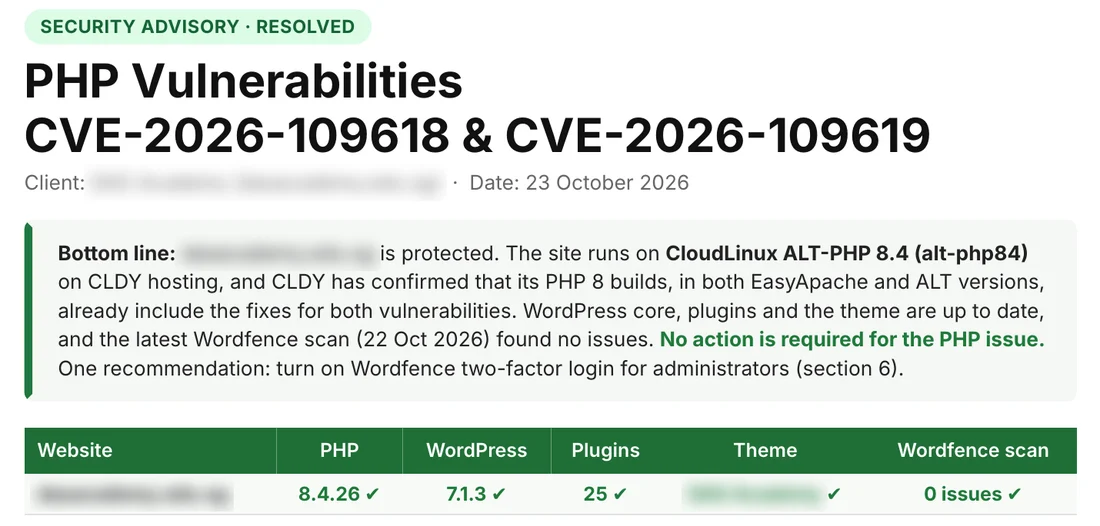
When two critical PHP vulnerabilities were disclosed on 21 October 2026 (covered in our PHP security article), we checked the websites we maintain and sent each client a short report. Here is what one of them, for a Singapore education provider, found two days later.
Security advisory · Resolved
Report sent 23 Oct 2026
PHP on the domain
8.4
CloudLinux ALT-PHP build, set in cPanel MultiPHP Manager
Hosting provider
Patched
Confirmed in writing that its PHP 8 builds include both fixes
WordPress, plugins, theme
Up to date
WordPress 7.1.3 and all 25 plugins on current versions
Wordfence scan
0 issues
No malware, no vulnerable plugins found
What it shows: Site Health reported PHP 8.4.26, one release behind the public 8.4.27, yet the site was protected. The host had back-ported the security fixes into its own build. A version number alone does not tell the whole story, which is why the report rests on the host’s written confirmation, not on the number.
The same check found one thing still worth doing: six administrator accounts had no two-factor login, so the report ended with a step-by-step guide to switching it on.
03
How to Check Which PHP Version Your WordPress Website Is Using
Two places, two minutes. The first shows what WordPress is really running on. The second shows what your hosting account is set to.
Method 1: The WordPress dashboard
- Log in to WordPress Admin
- Go to Tools
- Open Site Health
- Select the Info tab
- Expand Server
- Find PHP version

Tools → Site Health → Info → Server on a real website, 5 November 2026. It reports PHP 8.5.12, the latest 8.5 release. Server details blurred.
Method 2: Your hosting control panel
In cPanel the tool may be called MultiPHP Manager, Select PHP Version or PHP Selector, depending on your host. Look at the row for your own domain, not only the account’s default.

cPanel → MultiPHP Manager on the same website’s hosting account. 1 the system default is PHP 8.2; 2 the domain has its own setting, PHP 8.5. Domain hidden.
Here the domain setting is newer than the account default. The reverse is just as common: a modern default, and one older domain left on 7.4 years ago. And a version being offered in the list, like PHP 5.2 here, does not make it safe to choose.
- If the panel and Site Health disagree, ask your host or developer to confirm which version is really serving the site.
-
Never leave a public
phpinfo()file on a live website. It exposes server details to anyone. - Do not share hosting logins, or screenshots that show private server details.
04
How to Upgrade Your Website to a Newer PHP Version Safely
Upgrading PHP is routine maintenance, but it is not a switch to flip blindly. A sensible order:
Before the switch
Steps 1–5
- Back up the website files and database.
- Note the current PHP version.
- Review WordPress, theme, plugins and custom code against the target version, using the official PHP migration notes.
- Confirm which versions your hosting plan offers.
- Test on a staging copy where possible.
The switch
Step 6
- Switch the version in your panel, or ask your host to do it.
After the switch
Steps 7–9
- Check the key functions listed below.
- Review the PHP error log and fix any issues.
- Confirm Site Health now reports the intended version.
Functions worth testing after the switch:
- Homepage and key pages
- Contact forms
- Login and registration
- WooCommerce product pages
- Cart and checkout
- Payment integrations
- Custom features and APIs
An older website may show errors after the change, usually from an outdated plugin, theme or custom code that uses something newer PHP has removed. That is not a reason to avoid upgrading. It is the reason to test before and after, and to keep the backup ready.
Do you need the very latest branch? Not necessarily. For a site with older plugins, a well-tested supported branch such as 8.3 or 8.4 is often the safer first move. And for a particular vulnerability, a verified security patch on a supported branch can be enough; jumping to the newest branch is not the only fix.
Before and after: your PHP checklist
Tick off what you can confirm. Nothing is saved or sent anywhere.
0 of 8 confirmed
- I know which PHP version my website is running
- My PHP branch is still officially supported
- My host has applied the latest security patches
- The PHP version set for my domain is up to date
- WordPress, themes and plugins support the target version
- The website is backed up before upgrading
- Key website functions were tested after upgrading
- The PHP error log was checked after the change
All eight confirmed. Check again after your next hosting notice or plugin update.
05
Frequently Asked Questions
How do I know which PHP version my WordPress website is using?
Log in to WordPress, go to Tools, then Site Health, open the Info tab and expand Server. The PHP version row shows the version WordPress is running on. You can also check the PHP version set for your domain in your hosting control panel.
Does my hosting provider automatically update PHP?
Hosts usually apply security patches to the PHP packages on their servers. Whether your website is moved to a newer PHP branch depends on the host and plan. On many shared cPanel accounts, each domain keeps the version it was set to until someone changes it.
If my hosting provider updated PHP, do I still need to do anything?
Yes. Check which PHP version your website actually runs and whether that branch is still supported. If it is not, plan a tested upgrade.
Is PHP 7.0 still safe to use?
No. PHP 7.0 reached end of life on 10 January 2019 and no longer receives official security fixes. It should not be used for a live website.
What happens if my website is running PHP 7.4?
PHP 7.4 reached end of life on 28 November 2022, so newly found flaws may not be fixed for it and more plugins are dropping support. Plan an upgrade to a supported branch.
Site Health shows a PHP version one release behind the latest. Am I exposed?
Not necessarily. Some hosts, such as those using CloudLinux ALT-PHP builds, back-port security fixes into their own builds, so the number can look older while the fix is already in place. Ask your host to confirm in writing that the latest security fixes are applied to your version.
Should I upgrade directly to the latest PHP version?
Not always. Check compatibility first. For a site with older plugins or custom code, a supported and well-tested branch such as 8.3 or 8.4 is often the safer first step.
Can updating PHP break my WordPress website?
It can, if a plugin, theme or custom code is not compatible with the new version. That is why you back up first, test on staging where possible and check the site and error log after the switch.
Does updating WordPress also update PHP?
No. WordPress runs on whatever PHP version your hosting provider provides. Updating WordPress does not change it.
How often should I check my website’s PHP version?
Check it at least every few months, after any hosting notice about PHP, and before a PHP branch you rely on reaches the end of its security support.
Can SG Web Builder help upgrade my website’s PHP version?
Yes. We can check your current PHP version, review compatibility, coordinate with your host and carry out a backed-up, tested upgrade. Server-level patching is done by your host or server administrator.
Sources
PHP check & upgrade
Not sure which PHP version your website is running?
Let SG Web Builder check your website and help you plan a safe PHP upgrade, as part of our WordPress website maintenance.
What we do for you
- Check your PHP version and hosting setup
- Review plugin and theme compatibility
- Back up, upgrade and test the website
- Coordinate with your host on server-level patches
S$80
per hour
Patching the server itself is done by your hosting provider or server administrator. See also how to keep your WordPress website secure and up to date.